BhuSutra is in development. Free trials are by request and approval.
The restaurant intelligence OS

Know where every dollar goes,
before month-end.

BhuSutra connects your till, kitchen, stock and books, then tells you what changed and what to do next. It runs in your browser and your data stays on your own computer.

Which of these sounds like your restaurant?

Free trial by request, at the bottom of the page. No payment details.

See it work

Five problems, solved in under 40 seconds each

Pick the one that hurts most. Each short animation shows the problem and then what BhuSutra does differently.

Illustration with sample numbers. The app does this with your own data.

Five features that pay for themselves

The features owners rely on most

Real screens from the app, shown with a sample restaurant and a year of sample sales. Pick a feature on the left, or click the picture to open it at full size.

And much more

The rest of BhuSutra, when you want it

Everything else is one click away. Open what you are curious about.

Browse all 57 featuresEvery page in the app, with search and filters

The intelligence layerAn AI analyst that shows its working, alerts, forecasts and approvals

Data

Every order, delivery, stock movement, expense, shift and price change is recorded once and shared by every page.

Understanding

Plain-English answers and driver tracing explain why profit, sales or cost moved, with the calculation shown.

Prediction

Forecasts for sales, cash, staffing and waste, scored afterwards so you can see how accurate they really are.

Action

Reorder drafts, price proposals and win-back lists, with a person approving anything that changes the business.

AI Analyst

Ask in plain words, get an answer you can check

Ask "Which menu items should I remove?" or "What was my best day ever?" and see the calculation, the date range and the records behind the answer.

  • Runs locally by default; a language model is off unless you switch it on
  • Replies containing a number that is not in the calculation are rejected
  • What-if questions use the same engine as the What-if lab
Why did profit drop last month?
Profit fell mainly because of higher ingredient cost on three dishes and 6% more discounting. Orders and average bill were steady.Calculation, date range and source records shown below the answer. Sample text.
Profit drivers

See exactly why a number moved

Compare any two periods and get the causes ranked: orders, average bill, discounts, refunds, food cost, waste and labour.

  • Exact drivers, not guesses
  • Assistant tasks investigate and write it up for you
  • Daily, weekly and monthly management reports write themselves
Food cost−$1,240
Discounts−$610
Waste−$290
More orders+$980
Average bill+$330
Watchtower

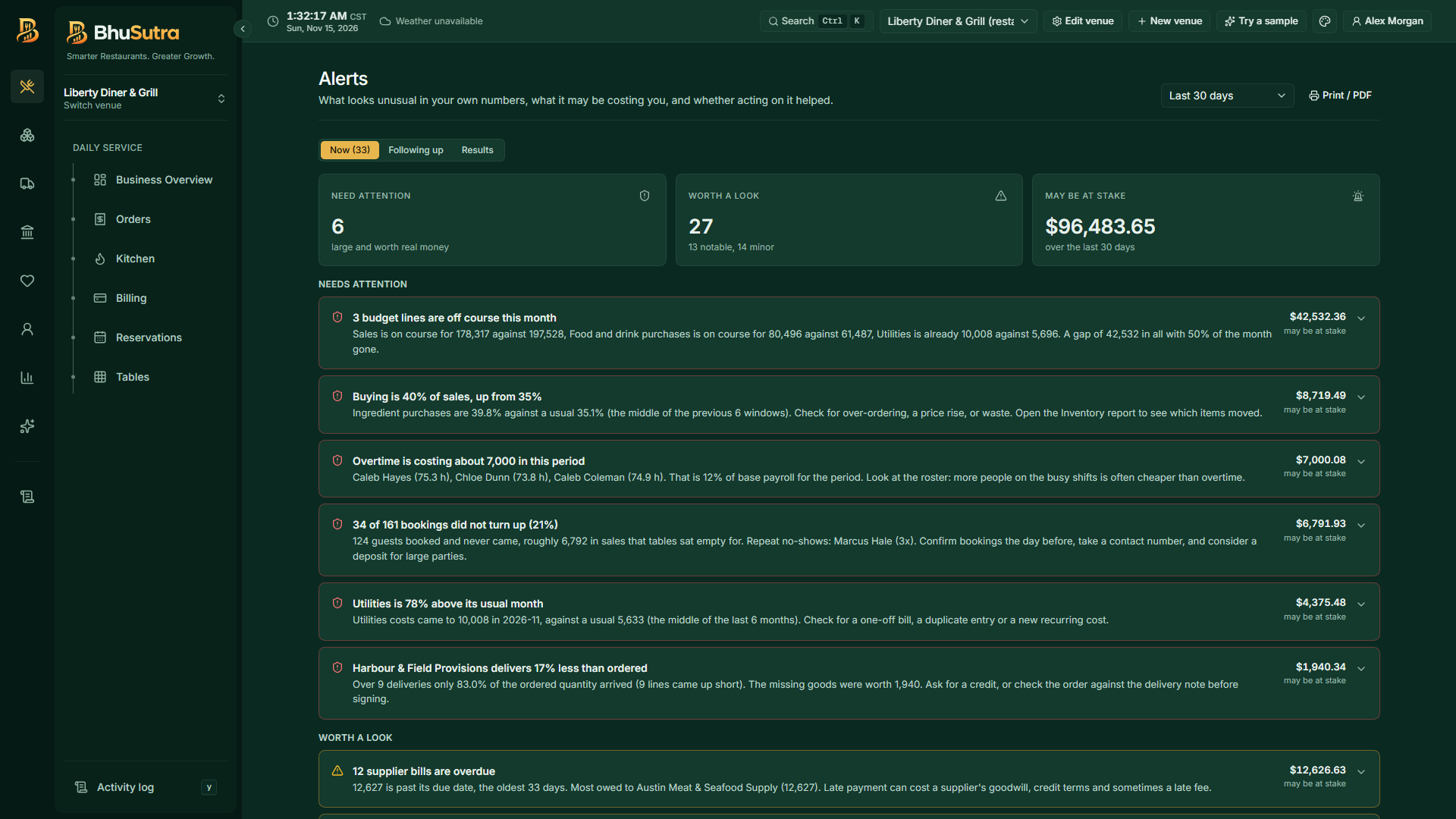
Problems found before month-end

Unusual activity is flagged as it happens, and you say whether you will act, it is not relevant, or it is handled. Acted-on alerts are re-measured to see if they helped.

  • Expense spikes and supplier price jumps
  • Heavy discounting, cancellations and who does them
  • Waste, stock adjustments and sales collapses
!Electricity bill is 2.3× its usual level
!Discounts reached 11% of sales this week
✓Supplier price rise: acted on, margin recovering
Forecast and What-if

Plan with numbers, not hunches

A 14-day sales forecast chooses its best model by walk-forward testing and shows a confidence band. Then test a decision before you make it.

  • Forecast cash, staffing demand and expected waste too
  • Try wastage −20%, labour −5% or prices +3%
  • Find the sales level that hits a profit target
Break-evenSales needed to cover every cost
Target profitSales level that reaches your goal
Price +3%Effect on margin and covers
Waste −20%Yearly saving at today's volume
Controlled agents

It drafts. You decide.

The assistant can prepare purchase orders and price changes, but anything that changes the business waits in an approval queue for a person.

  • Each morning it can draft orders for stock that would run out
  • Approving re-checks the facts, so a stale price or a sent order is refused
  • Scheduled runs can read and recommend, never execute
1Reorder plan finds items that will run out
2Assistant drafts the purchase orders
3A manager reviews, edits or rejects
✓Only an approved order is sent
Menu engineering

Know which dishes earn their place

Every dish is placed by popularity and contribution margin, with a clear next move and its projected effect.

  • Promote Stars, reprice Plowhorses, rework Puzzles, retire Dogs
  • Recipe costs follow live ingredient prices
  • Price changes are proposed through the approval queue
StarsPopular and profitable. Protect them.
PlowhorsesPopular, thin margin. Reprice or trim cost.
PuzzlesProfitable, rarely ordered. Promote.
DogsNeither. Consider removing.
Built for a busy nightThermal bills, tax, tips, many venues, roles, audit trail and exports
🧾

Thermal-size bills

Customer bills print at 80 mm or 58 mm, with the restaurant's details, tax registration, invoice number, tax lines and tip, plus an optional Bill to for company invoices.

🏛️

Tax done properly

A country and region registry with US state and local rates, different tax classes per dish, tax-inclusive pricing, and tax shown per rate on every bill.

💵

Tips and tip credit

Tips are recorded on top of the bill, never counted as revenue, and the FICA tip credit is reflected in the books.

🧮

Invoice numbers

Sequential per venue, never reused or skipped, searchable in order history and the Sales register.

🏢

Many venues

Run several restaurants, bars or cafes, each with its own currency, time zone and tax, and compare them side by side.

🌍

Local currency and time

Money, number style and the clock follow each venue, including a seven-day weather outlook for planning.

🥜

Allergens and dietary flags

Dishes carry dietary and allergen information so the menu and guest ordering can be clear about it.

📤

Exports

Excel and CSV from every report, print-ready pages and PDF, and a plain backup of your data folder.

🛡️

Roles and permissions

Owners, managers and staff see only what they need. Refunds, voids and reopening cash closes need the right role.

📜

Full audit trail

Every successful change is logged with who and when, so nothing important happens quietly.

⌨️

Fast for staff

Command palette, single-key page jumps and shortcuts for the analyst. Everything is a keystroke away.

🎨

Make it yours

Three themes, each with its own free open-source fonts, and adjustable text size, with a hideable sidebar for small screens.

Your data, your machine

Private by design, secure to sign in

Your data lives on your own computer, in the browser and in a backup folder you choose. There is no hosted database and your business data is not uploaded. Other devices and guest ordering pass through a relay that stores nothing.

🗄️

One file you own

SQLite storage you can copy and back up. DuckDB powers the analyst's quick facts locally.

🔐

Two-step sign-in

Google sign-in, then a passkey (fingerprint, face or device PIN) or an authenticator code, with one-time recovery codes.

👥

Invite-only team

The first person becomes the owner. Everyone else must be invited, and sessions can be reviewed per device.

🧠

AI on your terms

Local by default. A language model can be connected, but external services need to be explicitly allowed.

Plans in design

Basics are never locked away

Orders, inventory accuracy and core financial reporting are never artificially restricted. Plans differ by depth and AI.

Starter

For a single outlet getting organised

  • POS and orders
  • Kitchen display and tables
  • Basic inventory and purchasing
  • Basic menu
  • Basic financial and sales reports
  • Basic AI assistant

Professional

For owners who want to see profit clearly

  • Everything in Starter
  • Advanced inventory and recipe costing
  • Full Profit & Loss
  • Staff and payroll
  • Customers and CRM
  • Advanced AI analyst and automated reports
  • Menu profitability

Business

For groups and data-driven operators

  • Everything in Professional
  • Forecasting
  • AI anomaly detection (Watchtower)
  • Advanced staff analytics
  • Multi-location with consolidated reporting
  • Priority support

Plan contents may change before launch. Pricing will be announced when BhuSutra opens.

Before you start

What you need to run BhuSutra

BhuSutra runs in your web browser and saves your restaurant's data on your own computer. A few things are worth knowing before you set up.

Show the setup checklistBrowser, backups, extra devices and your trial key
🌐

Use Chrome or Edge

Set up on a Windows, Mac or Linux computer in Google Chrome or Microsoft Edge, in a normal (not private) window. This is your main computer. Firefox and Safari cannot save backups to a folder, so they are not supported for it. Phones and tablets can join as staff phones or kitchen screens.

💻

Keep the main computer on

Keep it switched on, awake and online with BhuSutra open during service. Kitchen screens, staff phones and guests who scan a table QR code reach your data through it. If it is off, guests see "ordering paused, ask staff". There is no offline mode.

💾

Set up your backups on day one

Your data is not on our servers, so we cannot recover it for you. In Settings, Data, choose a backup folder; every backup and a live copy are saved there. Allow access again after each browser restart, and keep a second copy on a USB drive or cloud drive.

🧹

Never clear the site data

Clearing the browser's cookies and site data for BhuSutra, or running a clean-up tool that does, deletes your restaurant data. If that happens, restore from your backup folder.

📱

Add other devices with a code

Open Devices, then Add a device, for a one-use pairing code (valid for 10 minutes). Staff then sign in with their own PIN. Guests need nothing but the table QR code. Messages between devices pass through a relay that stores none of your business data.

🔑

Keep your trial key private

You get a trial key once your request is approved. Use it on one main computer; to move, restore your backup there. Read the full guide.

Questions

Good to know

Can I try BhuSutra?

Yes, by request. Fill in the trial form and, once your request is approved, you receive a trial key that works for about a week. Check the status of your request any time on this page. Inside, "Try a sample" loads a restaurant with two years of sales, stock, staff and customers in about a minute, so you can explore before entering your own.

Does the website or the trial store my restaurant data?

No. Your restaurant data lives on your own computer, inside the browser and in a backup folder you choose, and never comes to us. The website keeps only what you type in the trial form (name, email, venue, country, a note) and, once approved, your trial key and its dates. The website sets no cookies. The app keeps a few strictly necessary items in your browser, as described in the cookie notice.

Where is my data stored?

In your browser's private storage on your main computer, plus a backup folder you choose on the same computer. Nothing is uploaded to a hosted database. Choose the backup folder in Settings, Data, as soon as you start.

Does the AI make up numbers?

No. Figures come from a tested calculation layer. When a language model is used to phrase an answer, any reply containing a number that is not in the calculation is rejected.

Can the assistant change things on its own?

No. It can read and recommend, and it can draft purchase orders or price changes, but those wait in an approval queue until a person approves them.

Does it handle sales tax and tips?

Yes. It has a country and region registry with US state and local rates, tax classes per dish, tax-inclusive pricing, tip recording, and tax shown per rate on every bill. Tips and sales tax are never counted as revenue.

Can it run more than one venue?

Yes. Each venue has its own currency, time zone and tax, and the All locations page compares them and supports group buying.

Which printers does the customer bill suit?

Thermal receipt printers. The bill is built for 80 mm and 58 mm paper rather than A4.

Free trial

Try BhuSutra for a week

Tell us about your place. We review each request personally and, once approved, you get a trial key that runs for about seven days.

  • Try a ready-made sample restaurant with two years of history, so every page has data to explore
  • Your data stays on your own computer
  • No payment details and no cookies. This website stores nothing in your browser; the app keeps only the few items it needs to run on your device
  • We keep only what you type here. See the Privacy policy

Already asked? Check your request

57 features9 areas1 file holds all your data3 themes